Snapfish vs. Shutterfly vs. Mpix vs. FreePrints: Quality and Price Compared
We all known that online photo printing services allow users to easily order prints from anywhere with an internet connection and have them delivered to their doorstep, saving time and effort. Furthermore, these services offer a variety of print sizes, finishes, and customization options. So they are popular due to their convenience, wide range of options, and often lower costs compared to traditional methods. Snapfish, Shutterfly, Mpix, and FreePrints are all popular platforms for printing photos online, but which one is best for you? What's the diffirences between them? Read my full Snapfish vs. Shutterfly vs. Mpix vs. FreePrints comparison below to see which online photo printing service is best for you. By the end of this article, you'll be equipped with the critical information needed to choose the online photo printing service that aligns with your personal needs and helps you keep your precious memories.
Snapfish Review (Best for Free Prints for Mobile Users)
Official Website: https://www.snapfish.com/
Best For: If you want free prints and are willing to download an app to get them, Snapfish is worth considering.
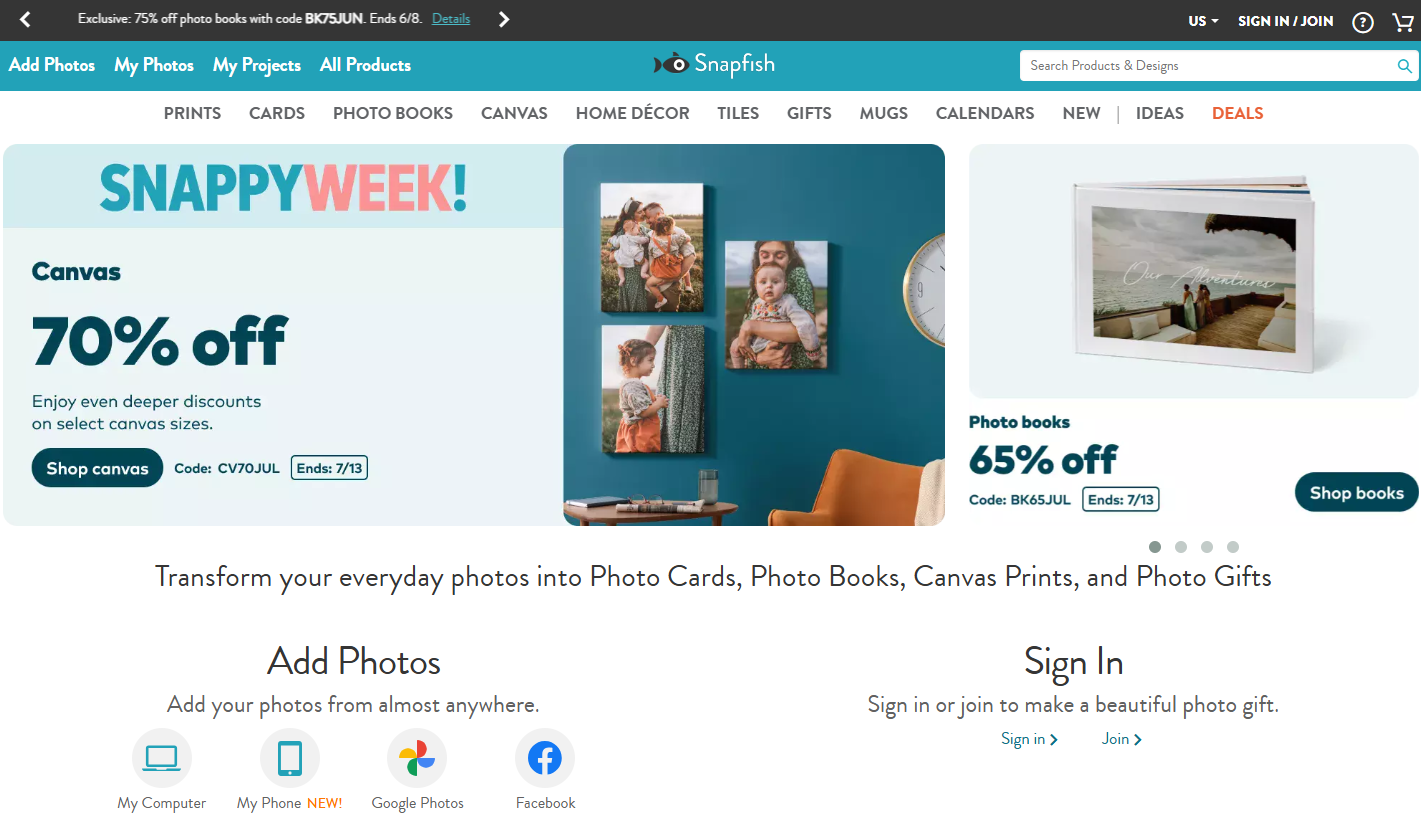
Alongside Shutterfly, Snapfish is one of the most well-known online photo print services around. The two are owned by the same company and deliver the same quality of prints—which is merely mediocre—but Snapfish charges half of what Shutterfly does for a standard print.
Snapfish is, in general, a joy to use but we wish its photo products were as good as the customer experience. While Snapfish’s software is easy to use, its photo book and calendar finished in the back of the pack in terms of quality. Its snazzy photo cards were a pleasant surprise and, thanks to numerous discount offers, Snapfish had the best pricing.
Pros & Cons
| Pros: | Cons: |
|
|
|
|
|
|
|
|
|
|
Print your photos on Snapfish.com through Extrabux, you can get up to 3% Super Cash Back.
Shutterfly Review (A Not-So-Easy-To-Use Tool With A Decent Overall Finish)
Official Website: https://www.shutterfly.com/
Best For: Best for who wants for free prints. Shutterfly's app gets you free prints for the price of shipping only and adds the ability to order photo gifts.
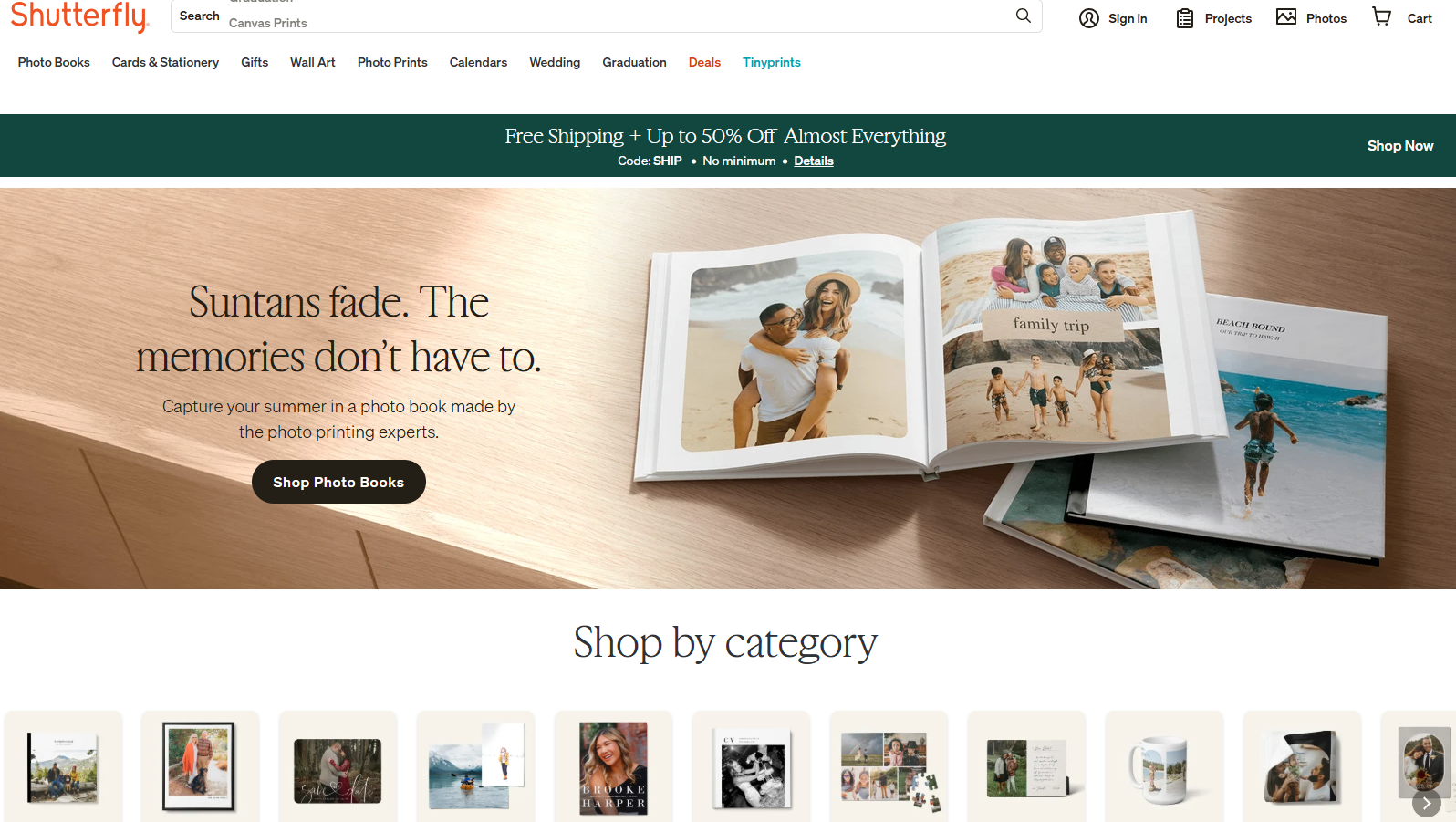
Like Snapfish, Shutterfly allows you to store and edit photos, share them with friends and family, and order lab-quality prints. So in its favor, Shutterfly has a good web interface and photo-sharing options. Yet thanks to its bright interface and extensive help files, Shutterfly seems friendlier than its competitors. Not planning to print? Need an easy online album? Try Shutterfly.
Working with Shutterfly is a breeze. Online registration takes just a couple of minutes and requires only your name and e-mail address. From its sign-in screen to your own personal album pages, the site's interface is simple and intuitive. Pages load quickly, even when hampered by one of the company's frequent pop-up ads. Your photo page displays either a single image and caption or a thumbnail album in the center of the screen. Editing commands and photo information are on the right and left, and a large button bar is across the top of the screen.
Though it may offer a tidy set of templates and page type options, Shutterfly’s photo book tool is often clunky, prone to glitches and overly restrictive.
Pros & Cons
| Pros: | Cons: |
|
|
|
|
|
|
|
|
|
|
|
|
Print your photos on Shutterfly.com through Extrabux, you can get 2% Super Cash Back.
Mpix Review (Best Paper Selection)
Official Website: https://www.mpix.com/
Best For: Because Mpix costs more than the budget players and offers more high-end options, it's best for professionals and serious amateur photographers.
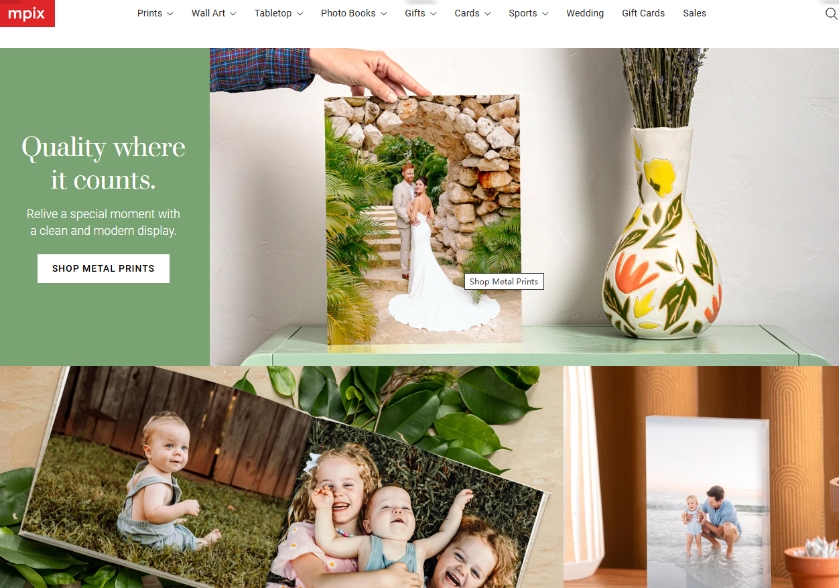
Mpix is an online print service of Miller's Lab, based in Pittsburg, Kansas which provides professional imaging services nationwide. In other words, Mpix is a well-known high-end photo printing service that claims the fastest by-mail turnaround time and offers specialties like giclée prints. Its prices are higher than those of some competing photo printing services, but its website interface, printing options, and shipment packaging are outstanding. Professional photographers will appreciate that it's one of the only major photo print services that still develops film.
Pros & Cons
| Pros: | Cons: |
|
|
|
|
|
|
| |
| |
| |
|
Print your photos on Mpix.com through Extrabux, you can get 6% Super Cash Back.
FreePrints Review (Pay $7.99 Shipping Fee & Get A Photo Book Every Month For FREE)
Official Website: https://www.freeprintsnow.com/
Best For: Best for who wants for a free photo book. Get a photo book every month for FREE on FreePrints App! No Subscriptions. No Commitments.
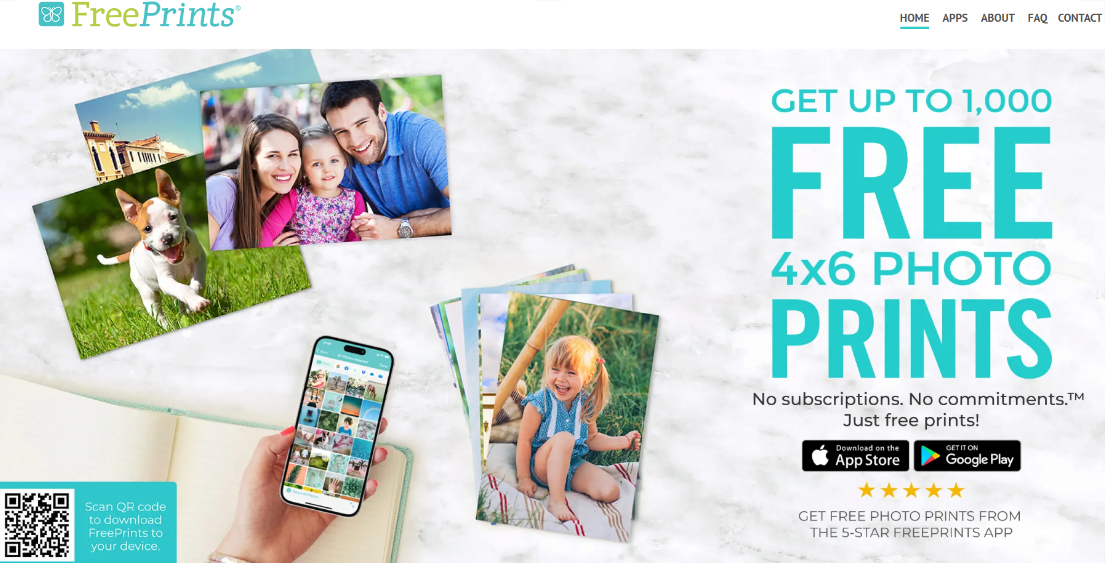
Create photo books quickly, easily and for FREE with the world’s #1 photo book app! No Subscriptions. No Commitments. You can get a photo book every month for FREE! The FreePrints Photobooks app changes all that with the fastest, easiest way to create beautiful photo books—right on your iPhone or iPad. And best of all, you get one 20-page standard softcover photo book every month for FREE! You pay only a small delivery charge ($7.99).
All FreePrints Photobooks feature premium papers, vivid color and long-lasting laminate covers. Interior pages are printed on acid-free, archival paper with a satin finish that makes photos sharp and vibrant. They’re printed and bound in the U.S. using the highest quality standards.
Pros & Cons
| Pros: | Cons: |
|
|
|
|
| |
| |
|
Saving Tip:
If you like online shopping, don't forget to sign up at Extrabux!(What is Extrabux) , then you can enjoy up to 30+% cashback on your purchase from Extrabux! Sign-Up Bonus: Free to join it & get $20 welcome bonus! Student Benefits:As long as you are a student at school, you can get a free whole year long VIP Card worth $199.
Extrabux.com cooperates with many merchants, such as: DeleteMe ($5 Super Cash Back), Incogni (40% Super Cash Back), Best Buy (Up to 5% cashback), Walmart (Up to 4% cashback), Rimowa (Up to 3.5% cashback), Walmart (Up to 4% cashback), Sephora(4% -5% cash back), Moosejaw (5% -6% cash back), LOOKFANTASTIC (Up to 10% cash back), Sam's Club (Up to 15% cashback), Norton(Up to 20% cashback), Microsoft (Up to 7% cash back) and so on. You can save on buying daily necessities, fashion, beauty, electronic products, broadband installation, mobile communication, air tickets, hotels and other aspects of life!


Snapfish vs. Shutterfly vs. Mpix vs. FreePrints
Overview:
| Snapfish | Shutterfly | Mpix | FreePrints | |
| Official Site | Snapfish.com | Shutterfly.com | Mpix.com | Freeprintsnow.com |
| App | ✔ | ✔ | ✔ | ✔ |
Extrabux cashback | up to 3%. | 2%. | 6%. | No cashback. |
| Sign-up bonus | Unlock 55% off | EXTRA 15% Off | 25% Off Your First Order | × |
Local pickup available | ✔(For some items) | ✔(For some items) | ✔(For some items) | × |
| Photo book | ✔ | ✔ | ✔ | ✔ |
Wall art, cards, photo books, canvas, home décor, tiles, gifts, mugs, calendars | ✔ | ✔ | ✔ | × |
| Shipping fee | From $1.99 | From $1.79. | Standard: $9.99 (Free on orders over $35+); Economy from $4.99. | $7.99 |
| Photo sizes | 4x6, 5x7, 8x10, 11x14, 16x20, 20x30. They also offer custom sizes and formats, including canvas prints and panoramic options. | 2.5x3.5, 4x4, 8x8, 4x6, 5x7, 8x10, 12x12, 16x20, 20x30. Custom sizes. | Wide range of photo print sizes, from small mini wallet prints (1.75x2.5") to large format prints up to 24x36". They also offer custom size prints upon request and various mounting and framing options. | 4x6, 5x5, 5x7, 8x10, 11x14, 12x18, 16x20, 20x30, Wallet |
Price:
Photo books: from $5.60.
Snapfish’s 8 x 8-inch square hardcover books start at $11.55 for 20 pages, while lay flat versions start at $15.05. You can get a standard hardcover at up to 11 x 14-inches for $26.25, while a premium layflat hardcover in that size goes for $40.25. Softcover books range in price from $5.60 (7 x 5-inch portrait or 5 x 7-inch landscape) to $8.05 (8 x 8-inch).
Photo books starting at $19.98.
An 8 x 8-inch hardcover book starts at $29.98 for 20 pages (Lay flat versions start at $45.98.) Standard hardcover books go up to 11 x 14-inches for $52.50. A softcover book ranges from $19.98 (8 x 8-inch) to $26.55 (11 x 8-inch). Deluxe layflat books start at $84.55 for an 10 x 10-inch with a leather cover.
For a 4-by-6-inch print, you pay 20 cents at Shutterfly, which is in the midrange compared with other services. However, if you use Shutterfly's mobile app, you can get unlimited 4-by-6 and 4-by-4 prints free, paying only shipping—though shipping is expensive.
Photo books starting at $29.99.
An 8 x 8-inch 20-page hardcover book starts at $29.99. Mpix book has a variety of other books, such as a 5 x 5 Economy Hardcover ($29.99), an 11 x 8.5 Premium Linen Hardcover ($54.99), a 9 x 8-inch Premium softcover ($24.99) and a 10x10-inch Premium custom Hardcover ($69.99).
Photo books (one free 5x7 or 6x6 standard softcover cover photo book every month, 20 pages), Pay only a small shipping charge of $7.99.
Photo Format:
Note that Snapfish lets you upload JPG/JPEG, PNG, and HEIC/HEIF file formats. Not all online photo printing services support the storage-saving HEIC/HEIF format, which is too bad.
Shutterfly allows more image file formats than most services: JPG, HEIC, BMP, and PNG. I applaud the service for supporting HEIF/HEIC because it's a format that saves space on your phone while maintaining high image quality.
Mpix saves your uploaded photos in folders for later use. One limitation is that on the website, you can only upload JPGs or PNGs—no HEIC/HEIF or TIFFs, though you can upload HEIC/HEIF files in the mobile app.
FreePrints supports common image formats for printing, with JPG/JPEG being the most widely used and recommended. You can also connect to cloud services like Facebook, Dropbox, Google Photos, and Microsoft OneDrive to easily access your photos for printing through the FreePrints app.
While JPG is the most common, for best quality results, consider using high-resolution images, ideally around 300 DPI.
Editing Tools:
Snapfish allows file sizes up to 150MB and up to 100 megapixels. If you have files that big, look to Mpix or Walmart Photo. Snapfish supports drag-and-drop from Windows File Explorer and macOS Finder to the upload window.
The ordering page tells you which photos fit best on a 4-by-5.3-inch print because of the camera's aspect ratio of 4:3 (used by smartphones) instead of 3:2 (used by most digital cameras), marking them with an orange Best Fit label. You can change the preselected Best Fit sizes to any of the other options.
Once you have your photos uploaded to Snapfish, you're in for a treat. You get basic editing—such as brightness, contrast, and cropping—which not all services offer. There's no slider for adjusting shadows, but one of the three autocorrect switches, Fill Flash, addresses that. You also get a few monochromatic filters, though nowhere near as many choices as Instagram and dedicated photo applications offer. You can crop in but not extend a crop to create a border if, say, part of your image is cut off because of the aspect ratio.
Shutterfly's editing tools are more limited than those you find on Snapfish. With Shutterfly, you can only crop, rotate, or add a border. You don't get any lighting adjustments as you do with Mpix. You do get an option to automatically enhance your photos, which is on by default. You should turn it off if you painstakingly adjusted your images in photo editing software like Lightroom.
Shutterfly makes adding and changing print sizes easy, showing all photos and size choices on a single page. You can even select multiple sizes for all the photos in your order in one place at the top.
One nice touch is that you can enter text to print on the back of each photo—very handy for remembering distant relatives or travel locations. By default, Shutterfly prints the filename on the back if you enter nothing. Most other services don't have this option, though Printique does, and Mpix lets you put the same text on the back of a whole set in a print job.
After you upload photos, you see a filmstrip view of thumbnails across the top, and each image is displayed large in the center with all the size options in a column on the left. Cropping, zooming, rotation, text overlay, and effects like black-and-white are available. You can also choose a paper type (standard, metallic, or black and white), luster or linen texture, and matting/mounting.
After you upload photos, you see a filmstrip view of thumbnails across the top, and each image is displayed large in the center with all the size options in a column on the left. Cropping, zooming, rotation, text overlay, and effects like black-and-white are available. You can also choose a paper type (standard, metallic, or black-and-white), luster or linen texture, and matting/mounting.
After you choose all your print sizes and quantities, the next page gives you more chances to make changes to your order. Here, you see a clear order summary with all the products and quantities you can choose. You can also change the print quality to giclée, glossy, semi-gloss, or fine art matte.
On the last page before finalizing the order, you can see the final image preview or add photo retouching services of several varieties: Facial, Glass Glare Removal, Stray Hair Removal, Red Eye Reduction, Braces Removal, and Teeth Whitening. Professional retouching is not offered by your run-of-the-mill photo printer, and most cost $8 per service for one head.
FreePrints is primarily a photo printing app and service, rather than a full-fledged photo editing software. While it offers some basic editing functionalities, its main purpose is to enable users to print their photos easily and affordably, offering a certain number of free prints each month (typically 4x6 inch prints), with users only paying for shipping.
Basic Editing: FreePrints offers basic editing tools like cropping and rotating images. It also includes options for choosing layouts, background colors, patterns, and themes for projects like photo books.
Limited Advanced Features: For more advanced photo editing features like applying creative filters, advanced color correction, or sophisticated retouching, you'll need to use a dedicated photo editing application before uploading them to FreePrints.
Automatic Enhancements: FreePrints may automatically apply some enhancements during the printing process, such as color reproduction, adjusting whites, and fade removal, according to a user review on Google Play.
Focus on Printing: The core value proposition of FreePrints lies in its convenience and affordability for printing photos from various sources, such as your phone, Facebook, Instagram, and cloud storage services like Google Photos, Dropbox, and OneDrive.
Local Pickup:
For some orders, Snapfish lets you choose to pick up your photos at a nearby CVS, Walgreens, or Walmart. If you can wait a few days, I recommend going the mail route in any case since the equipment and staff at local stores may not be as good as what's at the lab location.
Shutterfly lets you pick up your photos at Walgreens or CVS. The local pickup options would test a store's printers rather than Shutterfly's. Still, it's a handy option, especially when time is tight.
Mpix does not generally offer local pickup for photo orders in the way.
Freeprints also does not generally offer local pickup for photo orders in the way.
Shipping Options:
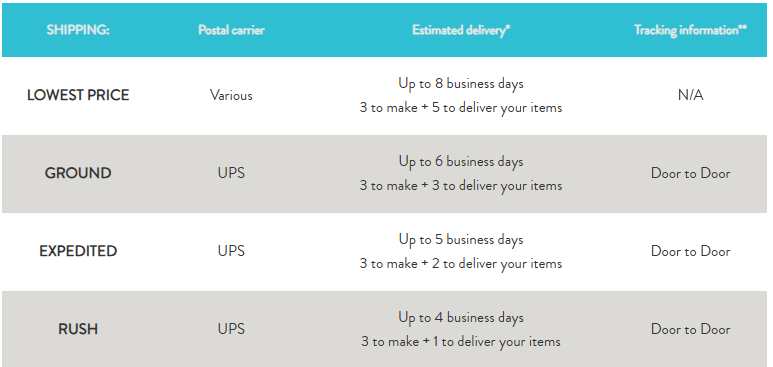
See checkout for the most accurate delivery info.
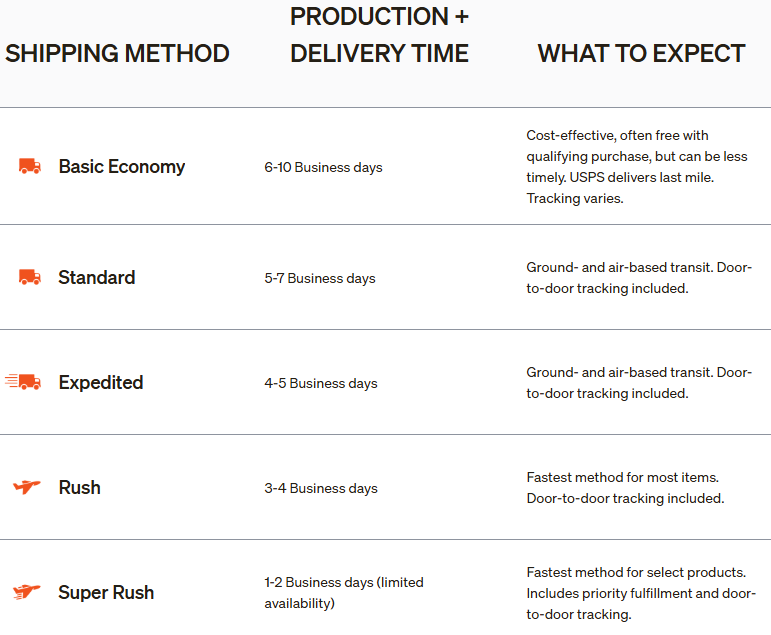
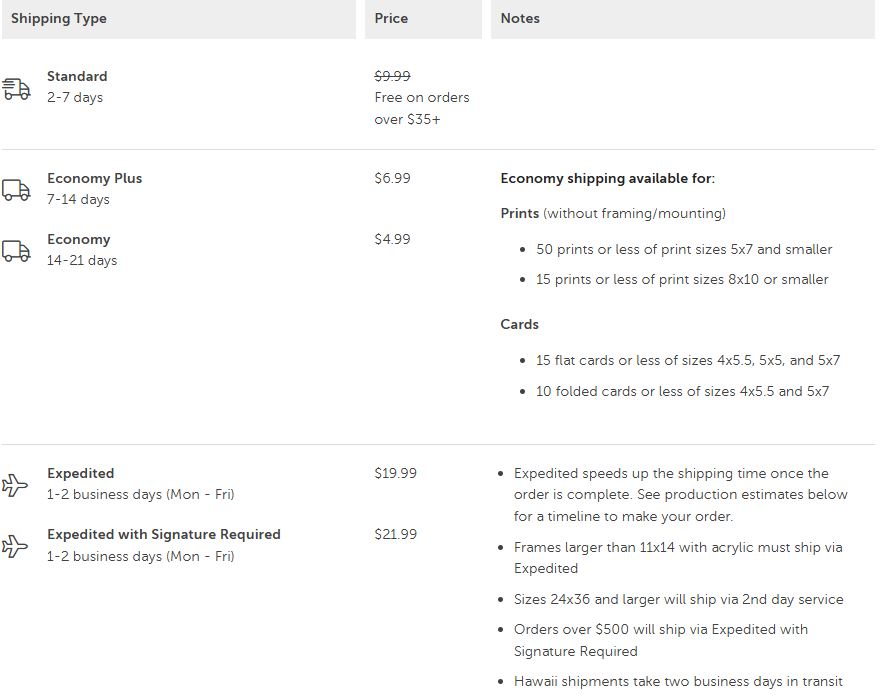
FreePrints Shipping & handling — starts at $1.99, never more than $9.99, no matter how many prints you order. FreePrints for iPhone and Android.
Ordering on Website or Through the App:
Snapfish.com (Website & App)
Ordering Photos on Snapfish.com:
You can start using Snapfish before you even create an online account (simply by entering your name and email address and choosing a password), but I recommend setting up your account before you get too far so you can keep track of your orders. I appreciate that you don't have to enter payment details to create an account. Snapfish lets you check out with PayPal, too.
Snapfish's interface is more modern and, well, snappy than Amazon Prints' and Nations Photo Lab's. It's pretty much the same interface used by CVS Photo. Starting your order is clear and simple. You upload image files or choose the printed product type first and then upload. You can upload photos directly from your computer and import them from Facebook, Google Photos, and Instagram.
The upload process is fast and painless. An Upload Preferences checkbox in the lower-right corner lets you choose whether to apply automatic red-eye correction and color correction. It also has Standard Resolution selected by default—I suggest changing it to Full Resolution if you want the best quality prints.
Ordering Through the Snapfish App:
In addition to the web interface, Snapfish offers an excellent mobile app and a good reason to use it: If you order through the app, you get 100 free 4-by-6 prints per month. Similarly, Shutterfly offers unlimited 4-by-6s. With both these deals, you do have to pay for shipping.
If you want to order other print sizes with the Snapfish mobile app, you certainly can. The app also has editing tools and sharing options, just like the web interface. You do need to sign into an account to edit and order, though. In other words, Shutterfly's app doesn't let you do anything without signing into an account. Shutterfly also doesn't have any image editing, and it makes ordering multiple print sizes hard.
Ordering Photos on Shutterfly.com:
Log in to your Shutterfly account or create a new one if you don't have one already. To order photo prints on Shutterfly.com, start by uploading your photos to your account, then select the desired print size and quantity. Customize your order with options like paper type and finish. Finally, review your order and proceed to checkout to complete the purchase.
Ordering Through the Shutterfly App:
Shutterfly also has a mobile app, and its big draw is that you can use it to get unlimited 4-by-4 and 4-by-6 prints, paying only for shipping. The app lets you upload photos from your device for printing. You can also see any photos you've uploaded from other devices. From the app, you can order not only prints but also mugs, iPhone cases, canvas prints, cushions, and other items. The mobile app lets you share online galleries, as Snapfish does, but there are still no in-app photo correction tools.
Ordering Photos on Mpix.com:
Mpix has a clear, well-designed website. The service lets you upload photos from your computer, and you can also get photos from your Google Photos account. Mpix saves your uploaded photos in folders for later use. One limitation is that on the website, you can only upload JPGs or PNGs—no HEIC/HEIF or TIFFs, though you can upload HEIC/HEIF files in the mobile app.
Ordering Through the Mpix App:
If desktop computers aren't your thing, Mpix has a mobile app called Tap to Print that lets you order from your phone using pictures on your phone. You get all the same capabilities as you do on the website, including cropping and mounting options.
Only can order on App:
To order photo prints on the FreePrints app, you'll first need to download the app and select the photos you want to print from your phone, Facebook, Dropbox, Google Photos, or OneDrive. Then, choose the quantity of each print and the desired paper finish (glossy or matte). Finally, confirm your order and pay the shipping fee (which may be free for your first order).
Packaging and Print Quality:
Snapfish's packaging isn’t anything to write home about, especially compared with the high-end services’ hard cardboard boxes. Snapfish orders generally in a standard express mail cardboard envelope.
In general, Snapfish print quality is not too bad, though one set of CVS 4-by-6s had mechanical streaking I met. Snapfish's prints are quite good in terms of color and sharpness, but sometimes you can see that the service's prints have a certain blotchiness, too.
Snapfish photos are printed on paper with an in-house Snapfish watermark on the back; the service used to use Fujicolor Crystal Archive. You don't get the filename or text of your choice printed on the back, as you do with Shutterfly and Printique, which use Fuji Crystal Archive paper. Nations Photo Lab uses Kodak Professional Endura paper, long-lasting professional-grade media.
Shutterfly used to deliver photos in better packaging than some other budget services, but it no longer uses separate cardboard envelopes for each print size. The 4-by-6s come in a thin cardboard sleeve inside a light-cardboard outer envelope. Another piece of cardboard is an unsuccessful attempt to keep the loose 8-by-10 print flat.
Shutterfly uses its own branded photo paper; it formerly used Fuji Crystal Archive paper, which is of good quality, though on the thin side.
For its low price, Shutterfly delivers acceptable small prints with decent color fidelity. The pictures suffer from graininess, however, making them less sharp than the output we see with competing services. Overall, the picture is fuzzier than prints from most competitors. In fact, the Shutterfly print is remarkably similar to photos from EZPrints and Snapfish.
Mpix will ship your prints in a cardboard envelope with clear plastic sleeves stiffened by sheets of cardboard inside for each set of photos. The company did not use a cardboard box the way Nations Photo Lab and Printique did for the same order. An included invoice clearly states the contents.
The print quality from Mpix is very good. In generally, 4-by-6 prints came on Fuji Professional paper, while the 8-by-10s used paper with no identifying watermark. Mpix’s standard E-surface paper option that the service suggests has a slightly marbled, matte texture. That's fine for most uses. Most services offer an entry-level glossy option, but Mpix charges more for its two glossy options.
In comparing a portrait shot in 4-by-6 prints from the three high-end professional services with which it competes, the Mpix print has both more natural colors and more sharpness than Printique and Nations.
Users can choose between deluxe glossy or premium matte paper. Print quality is generally good, particularly for lighter, airy photos, but darker images may lose some detail. The app uses automatic color and contrast adjustments, which can sometimes lead to a shift in colors or a slightly processed look. The prints are made on Fuji Crystal Archive paper.
Bottom Line:
While which photo printing service you choose depends on your individual needs, here is a summary of key information to help you make the best choice:
Snapfish charges the low price for photo prints and uses a clear web interface, but the print results aren't high quality. But Snapfish offers some great design options, including premium material covers such as Linen. This is perfect for those who want a truly special book. And if you don’t mind going for a smaller book and missing out on premium design options, Snapfish’s books are very well-priced.
Shutterfly has a strong website and you can print your photos on a wide range of products. Its print image quality is lacking when compared with other services, however, and its prices are average to high.
But we appreciated Shutterfly’s efficient and dependable software, which was not only easy to use, it offered a wide array of templates and tools for customizing your photo products. Shutterfly’s photo books finished in the middle of the pack with appealing designs but a flimsy binding and inconsistent image exposure levels.
If you have a solid selection of photos and you aren’t too fussy on layout, Shutterfly could work just fine for you. There’s a decent selection of pre-made templates to choose from here, so if you want a quick, easy process, it will be better to use one of these.
If a pre-made template isn’t going to cut it and you want to make a totally bespoke photo book, Shutterfly might not be your best option. It can be quite restrictive in terms of selecting background colors and page elements, making it far from ideal if you have a unique vision in mind.
Mpix ordering pages, which are clear and packed with options. The price is the highest among these four photo print service, but it's within the expected range for a premium service.
In my opinion, the best thing about the FreePrints app is the fact that there is absolutely no commitment whatsoever. Nor is there anything that you have to subscribe to before you can take advantage of the free prints and free photo books. You can get 1 free 5×7 photobook every month! And for your very first order, you get 10 FREE 4×6 prints and FREE shipping.
Read More:




Extrabux is an international cashback shopping site, offering up to 30% cashback from 10,000+ Stores!
Squarespace, SkinStore, MATCHESFASHION, The Wall Street Journal, NordVPN, Visible, Armani Exchange, Sam's Club, PUMA, AliExpress, Card Cash, NET-A-PORTER, Udacity, Udemy, Selfridges, LOOKFANTASTIC, Vimeo, Coach Outlet, lululemon, PrettyLittleThing, Booking.com, Ripley's Aquarium, iHerb, Groupon, etc.
Join to get $20 welcome bonus now! (How does Welcome Bonus work?)
Recommendation
-

Where to Watch Chinese Short Dramas with English Subs: The Best Free and Paid Apps & Sites (2025)
-
Supreme LV Backpack Real vs. Fake Guide 2025: How Can I Tell If It Is Original?
-
U.S. Polo Assn. Cashback, Coupon Codes, and Savings Guide
-
The North Face vs. Columbia vs. Patagonia: Which is the Best Outdoor Gear Brand?
Up to 8% Cashback!
-
Chow Sang Sang Shopping Guide: Get Discounts & Cashback on Unique Holiday Gifts